Allocation — a portfolio platform for trading strategies
Allocation is a platform where several trading strategies connect to one account as a portfolio: with capital shares, separate copying rules for each subscription and shared analytics. We go through what it does, what it does not do and who it suits.
What to check before connecting. The feature set, the supported terminals and brokers, and the licence terms all change: verify them inside the service itself rather than in reviews — this one included. Copy trading guarantees no return, and the risk of losing your deposit remains in every format.
What Allocation is
Allocation is a portfolio management platform for trading strategies: it brings a strategy marketplace, position-size calculation, per-subscription limits and portfolio analytics into a single client area. Funds stay on the user's own trading account, and the platform has no withdrawal rights.
An ordinary copying service answers the question "whom should I follow". Allocation is built around a different one — "how do I split capital across several strategies and what do I do when one of them stops working". Hence its make-up: capital shares instead of a single subscription, separate protective rules for each strategy, and a breakdown of results by symbol, hour, day and trade direction.
The platform is not an investment fund, a discretionary manager or a prop firm, and it guarantees no return. The connection confirmed in the version reviewed was MetaTrader 5 to a broker server; support for a particular terminal, broker and account type has to be confirmed inside the service.
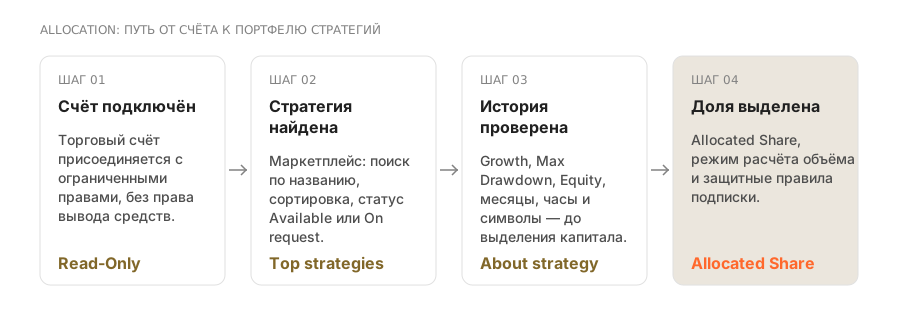
What the user journey looks like
The order of the steps matters: capital is allocated after the history has been checked, not before.
The trading account is joined with restricted rights. In the version reviewed that was MetaTrader 5 with the status Connected and access type Read-Only.
no withdrawal rightsThe Top strategies section: search by name, sorting, status Available or On request, Growth, Max Drawdown, Balance, Age and a balance sparkline.
marketplaceThe About strategy page shows the same analytics as the portfolio but for one strategy: metrics, Capital Growth against Equity, months, hours, symbols.
verify firstThe capital share, the sizing mode and the position management rules are set before the subscription is created, not after the first loss.
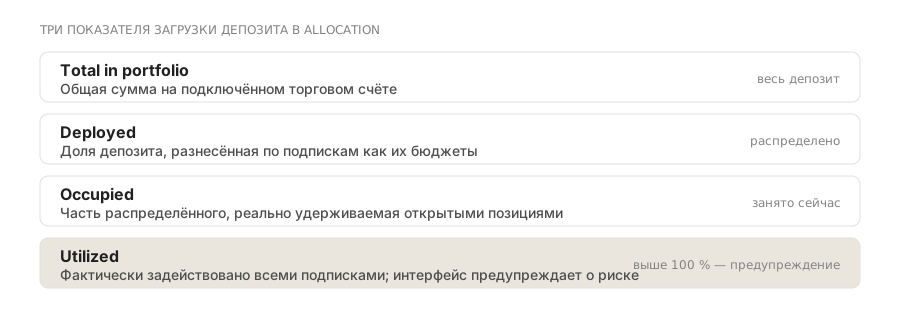
rules set in advanceHow much of the deposit is committed: three utilisation figures
The three figures describe different things, and confusing them is the costliest mistake: the first is a plan, the second a current state, the third a warning.
| Figure | What it means | When to look at it |
|---|---|---|
| Total in portfolio | The whole amount on the connected trading account | The starting point for calculating shares |
| Deployed | The share of the deposit spread across subscriptions as their budgets | To check whether the whole account has been allocated with no reserve |
| Occupied | The part of that allocation actually held by open positions | To see how much is free inside funds already allocated |
| Utilized | Actually committed by all subscriptions; a value above 100 % is flagged by the platform as a warning | The main signal that the deposit is overloaded |
The amount allocated to a subscription is an internal platform limit, not a separate account: the money is not physically ring-fenced in the terminal. The formula is simple — equity × subscription share ÷ 100: at equity of 10,000 and a share of 35 %, the subscription is allocated 3,500. From then on, every trade size is calculated against that budget rather than the whole deposit.
Utilisation above 100 % is a warning, not a loss. It means the combined subscription budgets exceed the deposit, so simultaneous positions may run out of free margin. That is a reason to revisit your shares, not a sign that money has already gone.
Smart Copy and manual mode
Two mutually exclusive ways of turning a capital share into a trade size. You choose at the subscription setup stage, and you can change it later.
How a capital share becomes a position size in ordinary copying, and why the minimum lot can push your risk above the lead trader's, is covered in the lot calculator.
Risk management per subscription
The limits are set separately for each strategy rather than as one value for the whole account.
A hard upper cap on the size of a single position, regardless of the lot the provider trades.
caps the outliersA multiplier on the provider's lot in manual mode. It moves both return and drawdown in the same direction.
manual modeThe subscription stops or closes when a set percentage of floating loss is exceeded.
not an exact levelNew positions are not copied depending on the provider's own current floating drawdown.
entry filterCopying in the opposite direction. An advanced mode: a losing strategy does not become profitable by being inverted.
needs testingPausing and resuming a subscription. Positions already open may stay open unless closed separately.
check your positionsA loss threshold is not a guarantee of closing at that level. In a sharp move, a gap or with slippage the actual result differs from the percentage you set. The rule lowers the chance of a deep drawdown; it does not fix its size.
Analytics: what it shows and what it does not do
The portfolio screen and the statistics are built on one set of tools: metrics, an equity curve, a breakdown by period and filters.
- eight metrics: Growth, Max Drawdown, Sharpe Ratio, Profit Factor, number of trades, winners and losers, and the share of time copying was active;
- a Capital Growth chart alongside Equity — the gap between them shows the unrealised result;
- a table of results by month and year;
- a breakdown of profit and loss by weekday, hour and symbol;
- a trade log with the provider's and the subscriber's prices, the execution difference and CSV export;
- a subscription event log, which also shows why a trade may have failed to copy.
- filters by symbol, hour, day and direction recalculate history rather than banning future trades;
- AI insights formulate hypotheses ("this symbol produces most of the drawdown") rather than decisions;
- an improved result "after filtering" may be curve-fitting to the past;
- Sharpe and Profit Factor are not comparable between strategies computed by different methods over different periods;
- no metric turns history into a forecast.
How to read these figures, and where a value stops being normal, is covered on the trader metrics and metric scale pages.
Why your result differs from the strategy's
A divergence is normal for any copying, and Allocation does not remove it. The causes are the same as on any platform.
What Allocation does not do
This list matters more than a list of features: it determines whether the platform suits your task.
What is announced as future features
In the interface version reviewed these items were marked "Soon". They cannot be treated as working — we list them so as not to create false expectations in either direction.
The copy settings presets in this list should not be confused with the already-working saving of analytics filter presets — they are different things. Check the current feature set and terms of use in the service itself: it is evolving, and this page may lag behind.
Who the platform suits and who it does not
Frequently asked questions
What Allocation is, in plain words
A client area where several trading strategies connect to one account of yours as a portfolio: each gets its own share of capital and its own limits, and the result is visible both per strategy and as a whole.
Does Allocation hold my money
No. Funds stay on the trading account with your broker. The platform connects with restricted rights and has no right to withdraw funds.
How Allocation differs from an ordinary copy service
By its unit of work. An ordinary service manages a subscription to one strategy; Allocation manages how capital is split across several and the overall portfolio picture: shares, deposit utilisation, combined metrics.
Which terminals and brokers are supported
The interface version reviewed connected MetaTrader 5 to a broker server. Universal support for MT4, for any broker or any account type cannot be claimed — check the current integrations inside the service.
What Smart Copy is
Automatic sizing: the provider's lot is scaled to the amount allocated to the subscription, then checked against your account's available margin and the maximum lot. If the minimum size will not fit, the trade is skipped.
How Deployed differs from Utilized
Deployed is how much of the deposit is spread across subscriptions as their budgets. Utilized is how much is actually committed by all subscriptions. A Utilized value above 100 % is flagged by the platform as elevated risk.
Do filters by hour and symbol block unprofitable trades
No, and this matters. Filters recalculate historical statistics — they show what the result would have been without a given symbol or hour. They create no ban on future trades.
Will Allocation help me pass a prop challenge
There are no guarantees. The platform gives you analytics by hour, symbol and direction, plus limits on size and floating loss, but it does not import a specific firm's rules, does not compute its limits automatically and does not issue a funded account.
What happens to open positions if I pause a subscription
A pause stops the copying of new trades. Positions already open may stay open — closing them is a separate action, through the subscription's position list.
How much does Allocation cost
Check the current price and licence terms on the product's own site: internal materials mention different models, and publishing them as a live offer would be wrong.
A consultation on your strategy portfolio
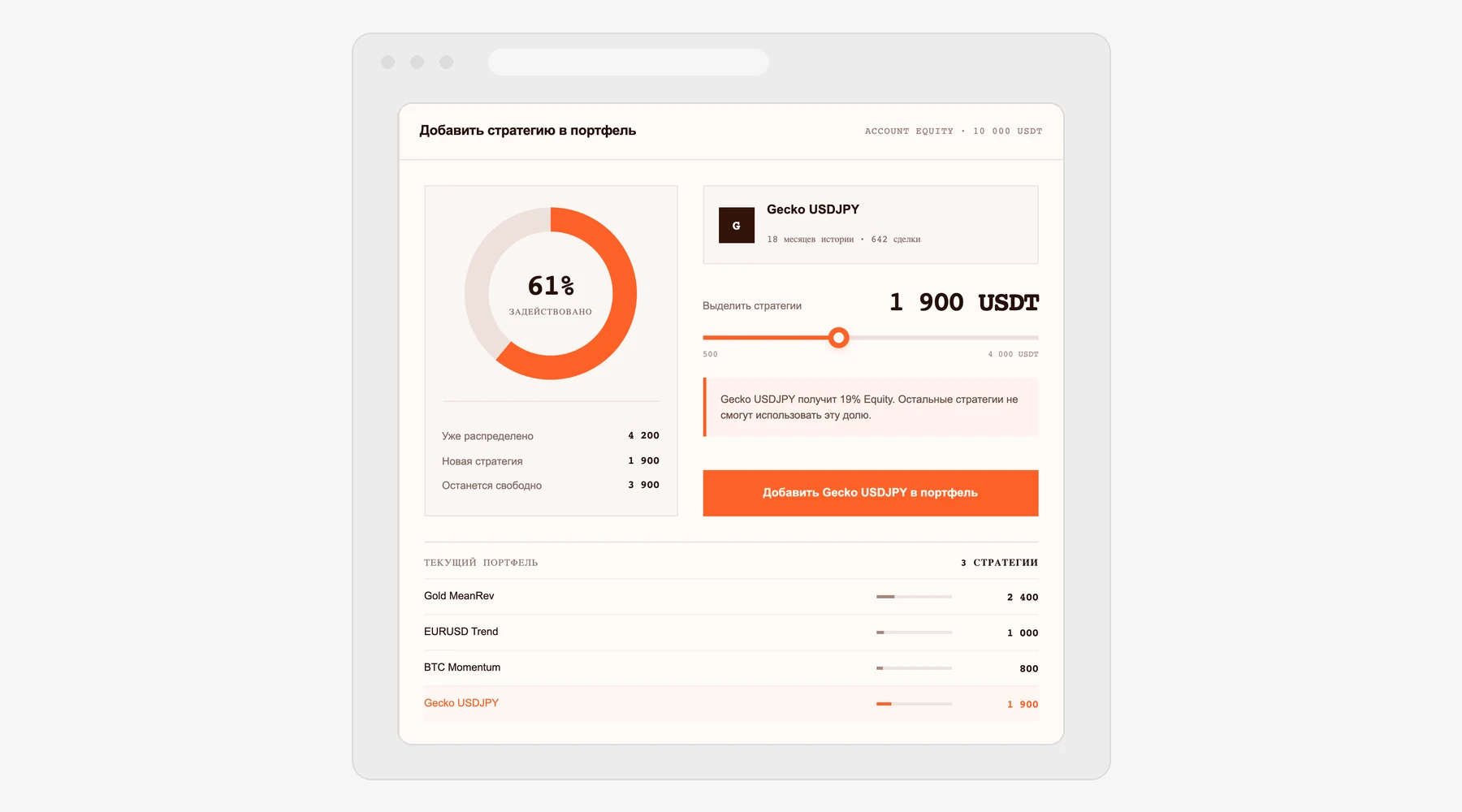
An interactive interface demo on the platform's own site as of the capture date: the screen is real, the figures in it are illustrative and promise no result. Colours have been matched to the site's palette.
Read next
